Packing Cubes and Secret Pockets: Where Does it All Go?
It's OK to keep things, but they've all got to live somewhere.

Organising your digital life without a destination is like Sort Your Life Out without the warehouse part; deciding what to keep means needing a home for it that doesn't turn into a digital landfill. This is where your priorities come back to the fore. Whether you’re a Pilot (just want it to work), a Sovereign (avoiding the FAANG folks), or a Test Engineer (wanting to tinker with the plumbing), you need a strategy that works for you.
Think of it like our backpack metaphor; this is the moment you realise that packing cubes will change your life. Even if you’ve discarded the rubbish, a disorganised bag is still a heavy one. Technology isn't clever enough yet to know exactly which 2019 phone bill you need to prove your address.
1. The Secret Pocket (Identity)
The items that are fixed parts of your identity—passports, birth certificates, the master keys to your life—need a vault. Most of us have a password manager, but we’re probably not using it as much as we could. These aren't just for Netflix logins; they are secure, encrypted "secret pockets." If you need to prove who you are in a hurry, you shouldn't be digging through a "General" folder.
Sovereigns may be more inclined to use a separate or independent service, such as Nordpass or ProtonPass.
Test Engineers might want to use something that better supports the API integrations for other services, i.e. something which supports client IDs and secrets.
A limitation of many "inbuilt" platforms like Google Password Manager is that their support for multiple types of things can be a bit limited - why keep a credit card in there when Google Wallet exists, and so on. So, entries can be limited to username/password/notes, which can still solve a lot of problems, but won't be as good as dedicated services where you can include files with entries.
2. The Backpack (Useful Items, Archives & Souvenirs)
This is for everything else. It needs to be flexible enough to hold photos, tax returns, and that PDF manual for a kitchen appliance you got on eBay. The trick isn't some fancy AI tagging system; it’s the humble folder.
Folders aren’t broken
There’s a reason folders have survived since the dawn of computing: they are conceptually simple. One person’s organisation is another person’s swamp (please stop sorting solely by "Year," it’s awful), but the structure itself works.
The Key Thing: The "00. Inbox"
The secret to a clear desk and a clear mind isn't a complex hierarchy; it’s a Landing Zone.
I name my primary folder 00. Inbox. Everything—scans, downloads, "save for later" docs—goes in there first. This stops files from breeding on your desktop like digital mould. Once a week (or month, no judgement here), you move things from the Inbox to their "packing cubes". My folders are in the image below, but you might want to start with something a bit smaller than that, or organise it along different lines:
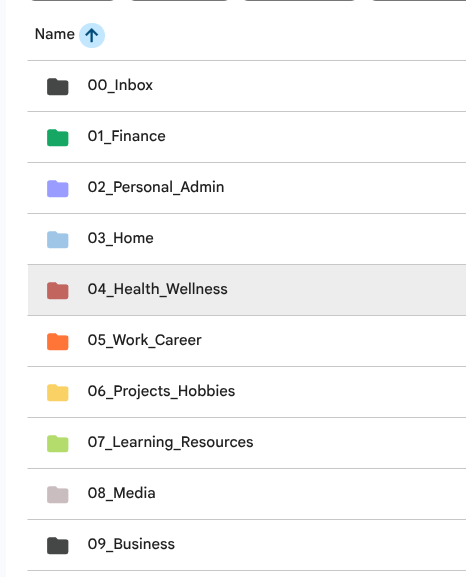
- 00. Inbox
- 01. Home (Rent, Utility bills)
- 02. Work (Contracts, CV, pay slips)
- 03. Travel (Bookings, Itineraries)
- 00. Inbox
- 01. Identity
- 02. Finances
- 03. Tickets and Confirmations
Or whatever you like. Just ensure it makes sense to you, you don't have to justify it to anyone else.
Pilots: You’re likely already paying for Google Drive or iCloud. Don't overthink it; just use the storage you have.
Test Engineers inevitably have your own Linux Server under the stairs or an S3 bucket, let's be honest 😂
Now you have the priorities, the knowledge, and the destination. The hard part is done! The sky is clearing.